Claude in Google Sheets vs Excel AI: Which Fits Finance Teams in 2026?
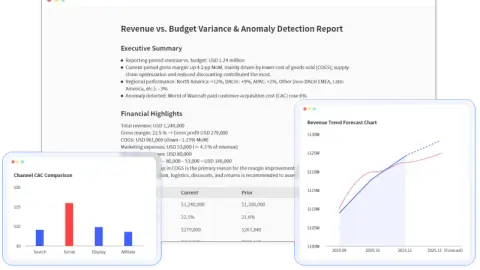
Claude in Google Sheets is useful for in-sheet work. This comparison shows when finance teams need Excel AI, a file-based analysis workflow, or a reviewable report instead.
149 stories
Claude in Google Sheets is useful for in-sheet work. This comparison shows when finance teams need Excel AI, a file-based analysis workflow, or a reviewable report instead.
A research-led guide to 8 spreadsheet-adjacent AI tools that separates publicly documented scope from capabilities that still need an in-product trial.
針對處理機密 Excel 檔案團隊的實用指南:如何使用私有化 Excel AI 代理進行財務報告、銷售匯出、庫存表及內部分析,確保機密數據不外洩。
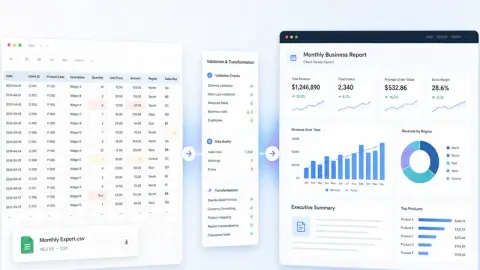
A CSV export is not a report. Here is a repeatable workflow for turning raw rows into a clean analysis report, executive summary, dashboard/report view, and shareable link stakeholders can actually review.
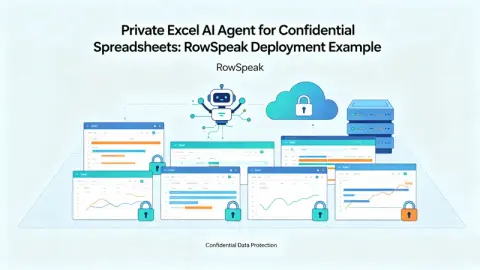
A practical guide for teams with sensitive Excel files: how to use a private Excel AI Agent for finance reports, sales exports, inventory sheets, and internal analysis without sending confidential data outside your environment.
機密性の高いExcelファイルを扱うチーム向けの実践ガイド:財務レポート、売上データ、在庫表、社内分析において、機密データを外部に送信せずプライベートExcel AIエージェントを活用する方法。
Ein Praxisleitfaden für Teams mit sensiblen Excel-Dateien: So nutzen Sie einen privaten Excel-KI-Agenten für Finanzberichte, Sales-Exporte, Inventarlisten und interne Analysen, ohne vertrauliche Daten aus Ihrer Umgebung zu übertragen.
Um guia prático para equipes com arquivos confidenciais do Excel: como usar um Agente de IA privado para Excel em relatórios financeiros, exportações de vendas, planilhas de inventário e análises internas sem enviar dados confidenciais para fora do seu ambiente.
Guide pratique pour les équipes manipulant des fichiers Excel sensibles : comment utiliser un agent IA privé pour vos rapports financiers, exports de ventes et analyses internes sans sortir vos données confidentielles de votre environnement.
Guía práctica para equipos con archivos de Excel confidenciales: cómo usar un Agente de IA privado para informes financieros, ventas, inventarios y análisis internos sin que sus datos salgan de su entorno.
A practical step-by-step workflow for creating an Excel dashboard with AI, including source data checks, prompt examples, review criteria, and where RowSpeak fits.
用兩種方式繪製鐘形曲線:在 Excel 中逐步建立,或將檔案上傳至 RowSpeak,用一句話要求生成。包含提示詞、審查檢查與常見錯誤。
Traza una curva de campana de dos maneras: créala paso a paso en Excel, o sube tu archivo a RowSpeak y pídela en una sola frase. Incluye prompts, controles de revisión y errores comunes.
ベルカーブを2通りで描く:Excelでステップごとに作成するか、ファイルをRowSpeakにアップロードして一文で依頼。プロンプト、レビューチェック、よくある間違いを含む。
Glockenkurve auf zwei Arten darstellen: Schritt für Schritt in Excel erstellen oder Ihre Datei bei RowSpeak hochladen und in einem Satz anfordern. Enthält Prompts, Prüfschritte und häufige Fehler.
종형 곡선을 두 가지 방식으로 그리기: Excel에서 단계별로 만들거나, RowSpeak에 파일을 업로드하고 한 문장으로 요청하세요. 프롬프트, 검토 체크, 흔한 실수를 포함합니다.
Trace uma curva normal de duas maneiras: construa-a passo a passo no Excel ou carregue seu arquivo no RowSpeak e peça-a em uma frase. Inclui prompts, verificações de revisão e erros comuns.
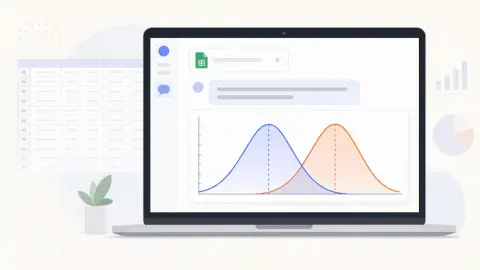
Plot a bell curve two ways: build it step by step in Excel, or upload your file to RowSpeak and ask for it in one sentence. Includes prompts, review checks, and common mistakes.
Showing 126 of 149 stories
Load more storiesGet the top AI news and tools straight to your inbox every week.
Weekly · AI news
Join 15,000+ AI enthusiasts