
How to Organise Work and Personal Logins in Off Grid AI Vault in 2026
Two accounts at the same website are easy to confuse. A login called "Portal" tells you little when one account is for work and the other is personal. OGAD (Off Grid AI Desktop) Pro lets you give Vault entries clear titles, place them in folders, mark favorites, and store several website URLs for…
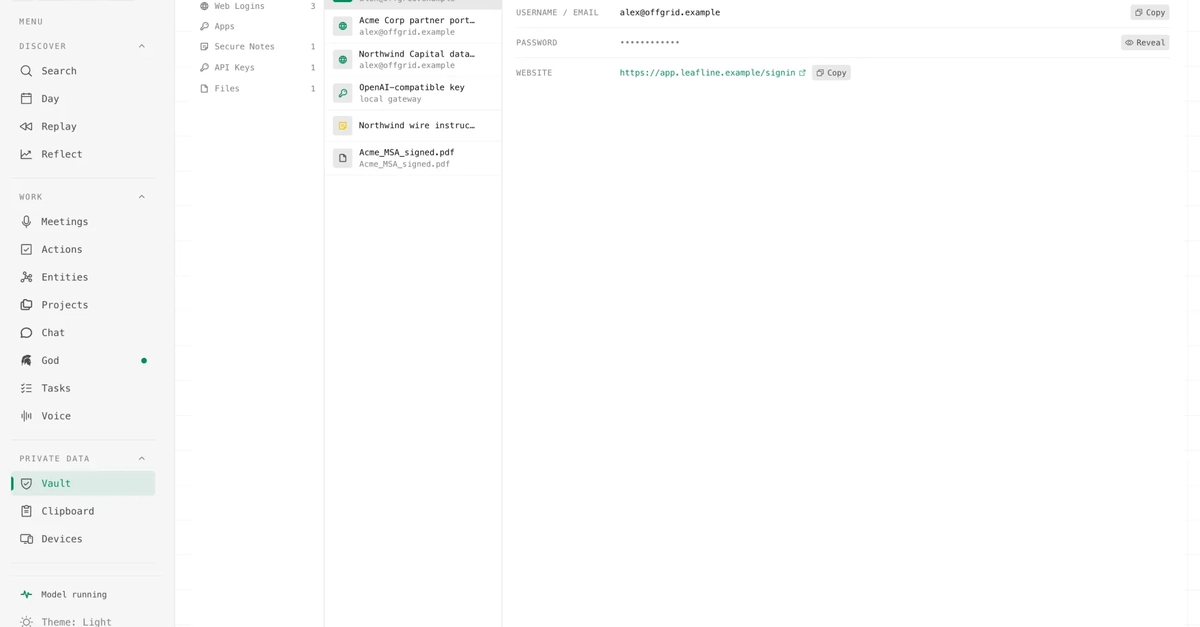
The article discusses how to organize work and personal logins using the Off Grid AI Vault (OGAD) Pro, focusing on features like clear titles, folder organization, and managing multiple website URLs for a single login.
What happened
The article explains how to effectively organize and manage multiple logins using the Off Grid AI Vault (OGAD) Pro. It covers naming conventions, folder organization, marking favorites, adding multiple URLs to a single login, and reviewing imported entries for accuracy.
Why it matters
For AI developers and IT professionals, this article provides practical guidance on managing digital identities and passwords efficiently, which is crucial for maintaining security and reducing the risk of account confusion or breaches.
- Use clear titles and folders to distinguish between work and personal logins.
- Mark favorites for frequently used accounts to streamline access.
- Review imported entries in small groups to ensure accuracy and avoid duplicates.
- Separate password organization from quality checks using Vault's audit tools.
- Always verify the actual website URL before submitting credentials.
The bigger picture
The practical organization of logins and passwords can significantly improve user experience and security, especially for individuals managing multiple accounts across various platforms.
The article provides a structured approach to organizing and managing logins using OGAD Pro, emphasizing clarity, security, and efficiency in password management.
Technical details
- OGAD Pro allows users to assign titles, folders, and favorites to login entries.
- Multiple URLs can be added to a single login entry.
- Vault entries can be filtered by folder or search text.
- Password audit tools are available for checking password strength and reuse.
FAQ
How can I organize my work and personal logins in OGAD Pro?
You can give each login a clear title, place them in folders, and mark favorites for frequently used accounts.
Can I add multiple URLs to a single login entry?
Yes, you can add multiple URLs to a single login entry if the same credentials are valid for different website addresses.
What should I do if a login seems to disappear after editing?
Check the folder filter and search text before recreating the entry, as an active filter can hide valid entries.
How do I review imported entries for accuracy?
Review imported entries in small groups, checking titles, usernames, URLs, and notes. Test important logins before removing old records.
Can I use OGAD Pro to manage password quality?
Yes, Vault's password audit tools can help identify weak or reused passwords, and you can update stored passwords after changing them on the actual website.
This summary and analysis were generated with AI from the original article and may contain errors. Read the original for the full story.
Read the full story
Originally published by Dev.to AI on Oct 13, 2026.
Comments
Sign in to join the discussion.