

Curflow
Replace keyboard shortcuts with mouse gestures for macOS.
What is Curflow?
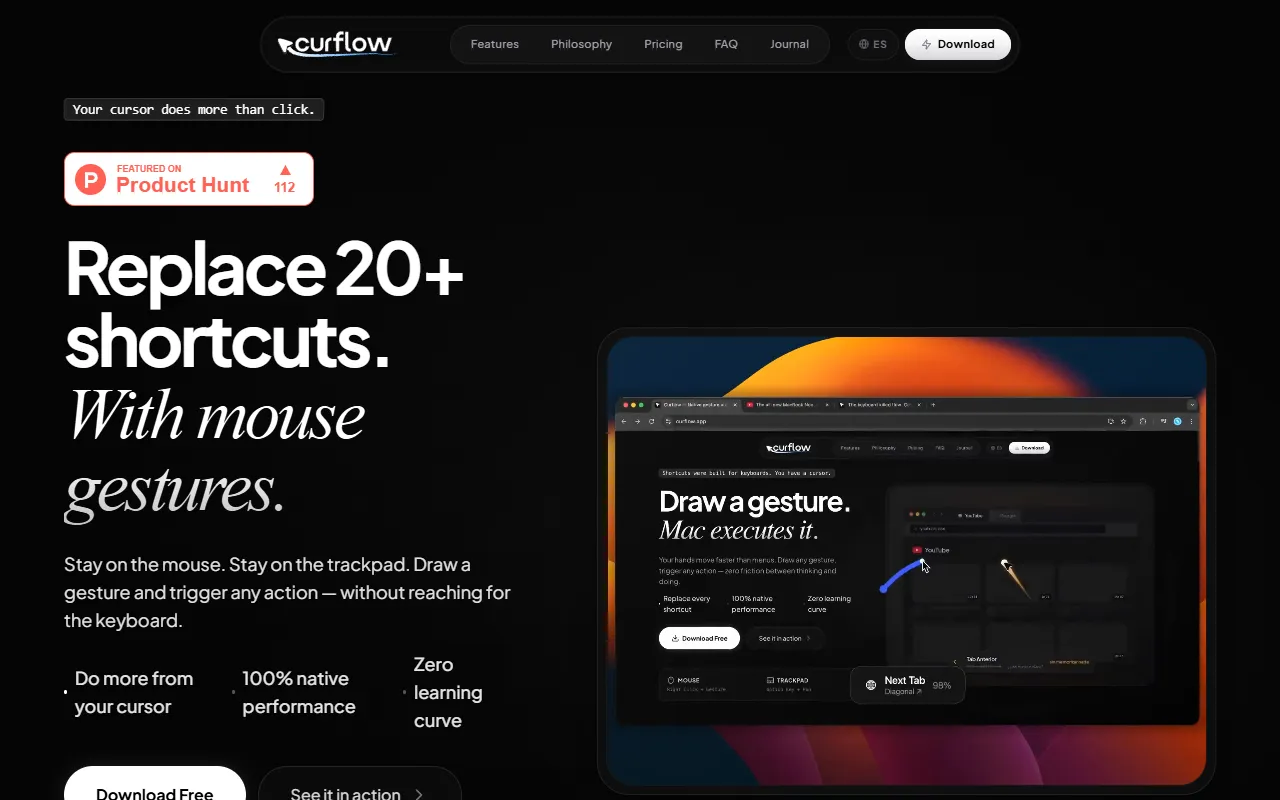
Curflow is a Browser Automation tool. Replace keyboard shortcuts with mouse gestures for macOS. It is available on macOS. It is aimed at mac users, productivity enthusiasts and developers.
Curflow is a native macOS app that replaces keyboard shortcuts with mouse gestures. It allows users to create custom gestures for any action, with per-app context automation and automatic active app detection. The tool uses a native Swift engine for zero latency performance.
Built for mac users, productivity enthusiasts and developers.
Features
Custom Mouse Gestures
Per-App Context Automation
Automatic Active App Detection
Per-App JSON Configuration
Native Swift Engine
Uses a native Swift engine for zero latency performance.
Cursor as Protagonist
The cursor is the main focus for gestures using mouse or trackpad.
Gesture for Every Shortcut
Each keyboard shortcut has a corresponding mouse gesture.
Draw Once Click to Repeat
Create a Flow in Seconds
Organized by Context
Use cases
- Replace keyboard shortcuts with custom mouse gestures
- Automate browser actions using predefined gestures
- Configure gestures per application using JSON settings
- Automatically detect and respond to the active application
- Create and repeat custom gestures for efficiency
Who it's for
Pros & cons
Pros
- Native macOS app with zero latency performance
- One-time payment with 14-day free trial
Cons
No documented limitations yet.
Security & compliance
- Data deletion
As stated on Curflow's website — not independently verified by AiByts.
FAQ
What is Curflow?
Curflow is a Browser Automation tool. Replace keyboard shortcuts with mouse gestures for macOS. Curflow is a native macOS app that replaces keyboard shortcuts with mouse gestures. It allows users to create custom gestures for any action, with per-app context automation and automatic active app detection. The tool uses a native Swift engine for zero latency performance.
What platforms does Curflow support?
Curflow is available on macOS.
Who should use Curflow?
Curflow is built for mac users, productivity enthusiasts and developers. Common uses: replace keyboard shortcuts with custom mouse gestures, automate browser actions using predefined gestures, configure gestures per application using JSON settings and automatically detect and respond to the active application.
What are the best alternatives to Curflow?
Similar tools on AiByts include Lyto, Cronloop AI, Trama, Airtop and Plouton AI.
Curflow news & updates
Mac Mouse Gestures: The Complete Beginner's Guide
Everything a Mac beginner needs to know about mouse gestures: what they are, how they work, what to automate first, and how to set them up in under ten minutes.
Curflow Blog8 min readI Replaced My Magic Mouse With a $30 Mouse and Software Gestures
The Magic Mouse looks great and hurts to use. I replaced it with a cheap Logitech and drawn mouse gestures — and recovered every gesture I lost, plus ones Apple never offered.
Curflow Blog9 min readHow to Use a Mac With One Hand: A One-Handed Workflow That Actually Works
When I had to use my Mac with one hand for six weeks, Sticky Keys and Voice Control weren't enough. Here's the one-handed workflow — trackball, gestures, and setup — that kept me shipping code.
Curflow Blog10 min readThe 5 Best Mac Mouse Gesture Apps in 2026 (Tested, Not Just Listed)
There are only five Mac mouse gesture apps worth your time in 2026, and they don't compete — each owns a different trade-off. Here's the decision matrix that picks for you.
Curflow Blog11 min readPer-App Mouse Gestures on Mac: Why One Shape Should Mean Different Things
Per-app mouse gestures on macOS overload one drawn shape with context-dependent actions, so you memorize fewer strokes and trigger more actions without collisions.
Curflow Blog13 min readApple Gives You 15 Trackpad Gestures. Here's How to Add Your Own.
macOS ships with roughly 15 built-in trackpad gestures — and no way to add more. There is no public API for custom trackpad gestures. To get gestures Apple didn't ship, you need a third-party app, and your options split by input device: BetterTouchTool for the trackpad, mouse-gesture apps like…
Curflow Blog8 min readStrokeIt for Mac: Mouse Gestures After Switching from Windows
StrokeIt defined mouse gestures on Windows for over a decade — 80 gestures, 140 KB, free. It never came to macOS. Here is what exists instead, and how to replicate the same workflow on your Mac.
Curflow Blog8 min readMulti-Monitor Mac Setup Is Chaos. Mouse Gestures Bring Order.
Two monitors, four desktops, thirty open tabs. Native macOS gives you keyboard shortcuts to navigate the mess — but none of them tell you where anything actually is. Mouse gestures solve the spatial problem behind the chaos.
Curflow Blog9 min readI Got Tendinitis From Keyboard Shortcuts. Mouse Gestures Saved My Mac Workflow
After developing tendinitis from years of keyboard shortcuts, I tried ergonomic mice, voice control, and every posture fix. The single change that let me keep working was moving half my workflow to mouse gestures.
Curflow Blog9 min readMouse Gestures vs Keyboard Shortcuts on Mac: When Each One Wins
Keyboard shortcuts work fine for simple tasks. But if you use multiple monitors, manage 30+ tabs, or navigate desktops constantly, mouse gestures solve a different problem entirely.
Curflow Blog7 min readI switched from Windows to Mac and missed mouse gestures. Here's why that matters.
After years of StrokesPlus on Windows, switching to Mac felt perfect — except for one thing: no mouse gestures. The constant mouse-to-keyboard switching was physically exhausting. Here's what changed when I got gestures back.
Curflow Blog5 min readBrowser Gestures vs System Gestures: Which Actually Scale?
Browser gestures work until you switch apps. System gestures follow you everywhere. The philosophy behind tools that scale with your workflow.
Curflow Blog6 min readGesturefy vs CrxMouse vs Gestury: Best Mouse Gesture Tool for Chrome, Firefox & Mac Apps (2026)
Browser gesture extensions like Gesturefy, CrxMouse and Gestury work inside a single browser. The moment you switch to Finder, Mail or any Mac app, they stop. Here's what actually works everywhere.
Curflow Blog5 min readGesturefy Not Working Outside Firefox? Here's What to Use Instead for System-Wide Mouse Gestures on Mac
Gesturefy is great inside Firefox. But the moment you switch to Chrome, Finder, or any native Mac app, your gestures disappear. Here's what actually works everywhere.
Curflow Blog7 min readBetterTouchTool vs Curflow: Which One Should You Choose?
BetterTouchTool is the Photoshop of gestures. Curflow is Figma. One gives you 500 options. The other gives you the 10 you actually need, working from minute one.
Curflow Blog6 min readStrokesPlus alternative for Mac: mouse gestures on macOS
If you came from Windows and used StrokesPlus, you know exactly what you are looking for on macOS. This is the guide to find it.
Curflow Blog6 min readThe 5 Best Mac Automation Tools in 2026: Shortcuts, BTT, Keyboard Maestro & More
Not all Mac automation tools solve the same problem. Shortcuts for Apple workflows, Keyboard Maestro for complex macros, BTT for input control, Curflow for zero-friction gestures — and where Automator left off.
Curflow Blog8 min readHow to automate repetitive tasks on Mac without memorizing keyboard shortcuts
Keyboard shortcuts have a cognitive ceiling. Past a certain point, the tool that was supposed to save you effort starts costing more than it saves.
Curflow Blog7 min read
Details are compiled from Curflow's website and public sources, last verified Oct 6, 2026. Features and pricing change — confirm on the official site before you buy.
Try Curflow
Visit the official website
Comments
Sign in to join the discussion.