
Chronock
Unified calendar app with scheduling links and automatic event copying
- Freemium· from $80/year
- Web
What is Chronock?
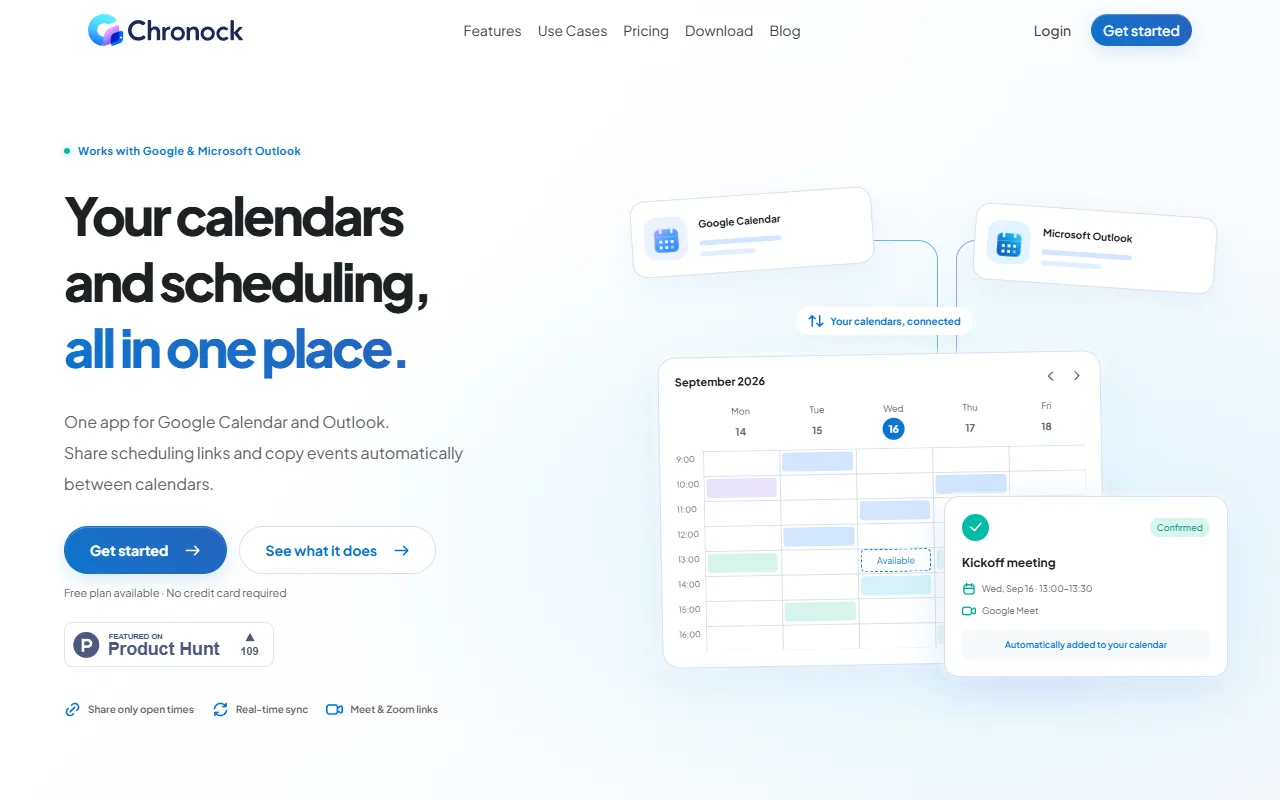
Chronock is a Calendar Management tool. Unified calendar app with scheduling links and automatic event copying. Chronock is freemium: it has a free plan, and paid plans start at $80/year. A free trial of 7 days is available. It is available on Web App. It is aimed at productivity teams and developers.
Chronock is a unified calendar app that allows users to manage Google Calendar and Outlook together. It provides scheduling links to find a time and automatically copies events between calendars. The app also offers features like managing booking history and contacts.
Built for productivity teams and developers.
Key capabilities
Features
Scheduling Links
Share a link to find a time
Automatic Event Copying
Copy events between calendars automatically
Unified Calendar View
View all connected calendars on one screen
Booking History Management
Team Booking Links
Double Booking Prevention
Private Event Details
Use cases
- Share a scheduling link to find a time
- Copy events between calendars automatically
- Manage booking history and contacts
- Prevent double bookings
- Keep event details private
Who it's for
Pros & cons
Pros
- Free plan available
- Free trial available
- Paid plans from USD 80/year
- Unlimited booking slots
Cons
No documented limitations yet.
Pricing
Freemium — paid plans start at $80/year. Free trial of 7 days available.
| Plan | Price |
|---|---|
| Free | Free |
| ProPopular | $80 / year |
Integrations
Security & compliance
- Encryption
- Data deletion
As stated on Chronock's website — not independently verified by AiByts.
FAQ
What is Chronock?
Chronock is a Calendar Management tool. Unified calendar app with scheduling links and automatic event copying. Chronock is a unified calendar app that allows users to manage Google Calendar and Outlook together. It provides scheduling links to find a time and automatically copies events between calendars. The app also offers features like managing booking history and contacts.
Is Chronock free?
Chronock has a free plan; advanced features require a paid plan.
How much does Chronock cost?
Chronock offers 2 plans: Free (Free) and Pro ($80 / year).
What platforms does Chronock support?
Chronock is available on Web App.
Who should use Chronock?
Chronock is built for productivity teams and developers. Common uses: share a scheduling link to find a time, copy events between calendars automatically, manage booking history and contacts and prevent double bookings.
What does Chronock integrate with?
Chronock integrates with Google Calendar, Zoom and Outlook.
What are the best alternatives to Chronock?
Similar tools on AiByts include Macuse, Aurora Notch, Hardbook, nocal and Scribbl.
Chronock news & updates
Reclaim.ai vs OneCal: calendar sync features compared
Reclaim.ai vs OneCal for calendar sync: providers, iCloud, multi-way sync, privacy controls, scheduling links, free plan, and pricing as of October 2026.
Chronock Blog16 min read
Reclaim.ai scheduling links: features, limits, alternatives
How Reclaim.ai scheduling (booking) links work: priority-based availability, link types, links per plan, branding, limits, and alternatives.
Chronock Blog8 min read
Morgen vs Chronock: Pricing, Sync, and Booking (2026)
Morgen vs Chronock for freelancers, consultants, and coaches: supported calendars, busy blocking, booking pages, AI planning, apps, and pricing compared.
Chronock Blog10 min read
Notion Calendar vs Chronock: Alternative for Client Work
Notion Calendar vs Chronock for freelancers and consultants: calendars, busy blocking, scheduling links, booking pages, apps, and pricing compared (2026).
Chronock Blog10 min read
Clockwise Alternatives After the March 2026 Shutdown
Clockwise shut down on March 27, 2026. Compare alternatives by the job you used it for: focus time, scheduling links, or keeping personal calendars in sync.
Chronock Blog11 min read
Keyboard shortcuts in Chronock for Mac
A guide to the keyboard shortcuts in the Chronock desktop app 26.10.3, covering the command palette, calendar actions, view switching, and arrow-key navigation.
Chronock Blog3 min read
Chronock for Mac is now available
The Chronock desktop app is available for Apple Silicon Macs running macOS 14 or later. Here is what it includes, how to install it, and how updates work.
Chronock Blog3 min read
Reclaim.ai Alternatives for Calendar Sync and Scheduling Links (2026)
Reclaim.ai alternatives for calendar sync and booking links: Reclaim vs OneCal sync compared, plus CalendarBridge, SyncThemCalendars, Morgen, and Chronock.
Chronock Blog12 min read
How to View Google Calendar and Outlook Together in One Place (Desktop and Phone)
Four ways to see Google Calendar and Outlook in one view: an ICS link, Google in Outlook, a phone calendar app, or an integrated calendar, and what each can do.
Chronock Blog9 min read
CalendarBridge vs Chronock (and Other CalendarBridge Alternatives)
CalendarBridge vs Chronock and OneCal: supported calendars, sync limits, scheduling pages, and pricing, plus other CalendarBridge alternatives (2026).
Chronock Blog12 min read
What Is a Unified Calendar? How It Differs from Sharing and Sync
A unified calendar shows calendars from several accounts and providers in one view. Here is how it compares with sharing, ICS subscriptions, and sync, and what to check before choosing an app.
Chronock Blog8 min read
How to Set Up Appointment Schedules in Google Calendar (Free Booking Page)
A free personal Google account can publish one booking page with appointment schedules. Step-by-step setup, sharing and embedding, what bookers see, and the limits to plan for.
Chronock Blog9 min read
How to Copy Outlook Calendar Events to Google Calendar (One at a Time, in Bulk, or Automatically)
Copy Outlook events to Google Calendar one at a time, in bulk with an .ics file, by URL subscription, or automatically. Steps and limits for each method.
Chronock Blog8 min read
How to View Multiple Google Calendar Accounts in One Calendar
Work Google Workspace account plus personal Gmail? Here is how to see both Google Calendars in one view: native sharing, the mobile app, where they fall short, and an integrated calendar.
Chronock Blog7 min read
How to Add Personal Appointments to Your Work Calendar: Private Events, Busy Blocks, or Automatic Copies
Doctor visits, school pickup, half days off: three ways to put personal appointments on your work calendar, from private events to automatic busy-only copies.
Chronock Blog8 min read
How to Block Family Events on Your Work Calendar as Busy (Pickups, Appointments, School Events)
Daycare pickup, pediatrician visits, school conferences: how to show family events on your work calendar as Busy without sharing any of the details.
Chronock Blog7 min read
How to share a single Google Calendar event without sharing your calendar
Share one Google Calendar event, not your whole calendar: invite people as guests, keep shareable events on a separate calendar, or mark the rest private.
Chronock Blog5 min read
How to Create a Scheduling Link in Outlook (3 Ways)
Share an Outlook link that lets people book time with you: Microsoft Bookings, Scheduling Poll, or a booking page that also checks your Google Calendar.
Chronock Blog4 min read
Details are compiled from Chronock's website and public sources, last verified Oct 6, 2026. Features and pricing change — confirm on the official site before you buy.
Try Chronock
Freemium · from $80/year
Comments
Sign in to join the discussion.