

Modeinspect
Production-grade AI design tool that runs in your codebase
- Freemium· from $20/month
- Web


What is Modeinspect?
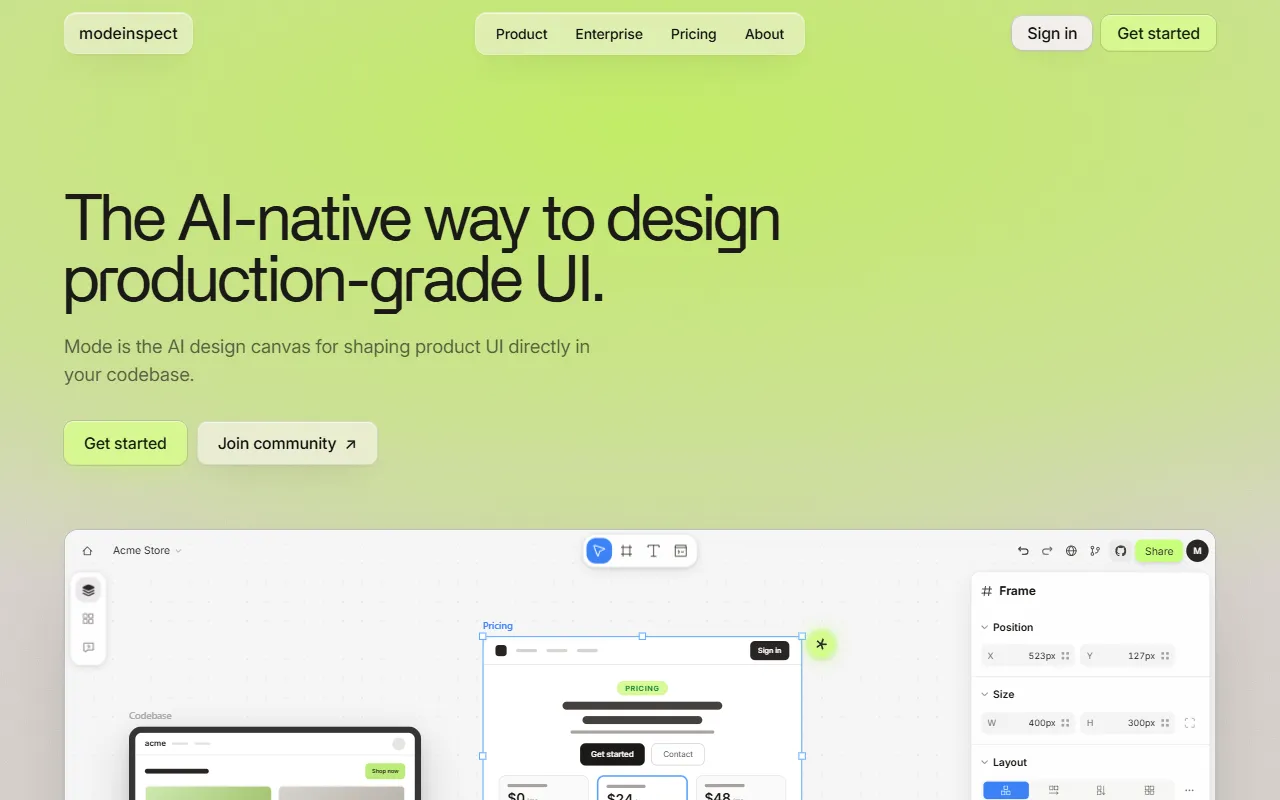
Modeinspect is a Component Generation tool. Production-grade AI design tool that runs in your codebase. Modeinspect is freemium: it has a free plan, and paid plans start at $20/month. It is available on Web App. It is aimed at design engineers.
A design tool that integrates with codebases, allowing design engineers to create high-fidelity designs without handoff. It supports components, tokens, breakpoints, and dynamic states directly in code.
Built for design engineers.
Key capabilities
Features
Design in code on a visual canvas
Components 1:1
Tokens, enforced
Breakpoints, native
Dynamic states
AI exploration
Build straight in code
Real data, real flows
Scoped, clean diffs
Production-grade
Ensures high-fidelity and production-ready designs.
Three workflows. One production loop
Use cases
- Design in code on a visual canvas
- Create high-fidelity designs without handoff
- Enforce design tokens for consistency
Who it's for
- Design engineers
Pros & cons
Pros
- Free plan available
- Paid plans from USD 20/month
- Custom/enterprise pricing via sales
Cons
No documented limitations yet.
Pricing
Freemium — paid plans start at $20/month.
| Plan | Price |
|---|---|
| Hobby | Free |
| Pro | $20 / month |
| Teams & enterprises | Custom |
Security & compliance
- SOC 2
- SSO
- SAML
- Two-factor authentication
- Data deletion
As stated on Modeinspect's website — not independently verified by AiByts.
FAQ
What is Modeinspect?
Modeinspect is a Component Generation tool. Production-grade AI design tool that runs in your codebase. A design tool that integrates with codebases, allowing design engineers to create high-fidelity designs without handoff. It supports components, tokens, breakpoints, and dynamic states directly in code.
Is Modeinspect free?
Modeinspect has a free plan; advanced features require a paid plan.
How much does Modeinspect cost?
Modeinspect offers 3 plans: Hobby (Free), Pro ($20 / month) and Teams & enterprises (Custom).
What platforms does Modeinspect support?
Modeinspect is available on Web App.
Who should use Modeinspect?
Modeinspect is built for design engineers. Common uses: design in code on a visual canvas, create high-fidelity designs without handoff and enforce design tokens for consistency.
What are the best alternatives to Modeinspect?
Similar tools on AiByts include Qursor, Tailgrids, Locofy.ai, Lovable and Croct.
Modeinspect news & updates
Storybook MCP, shadcn MCP and Figma MCP: how much MCP a design system needs
Storybook MCP, shadcn MCP and Figma MCP compared: what each returns to a coding agent, setup for Storybook and shadcn, and when you need no server.
Modeinspect Blog13 min read
Design system documentation that people and coding agents both read
Design system documentation kept beside the code: an AGENTS.md index, scoped rules, a doc comment with when not to use each component, and lint. Examples.
Modeinspect Blog16 min read
Vibe design: what it means, and why it only works on the real product
Vibe design means directing UI by describing it to an AI. Where the term came from, why it holds up only on the real product, and six prompts to copy.
Modeinspect Blog13 min read
Design system governance when agents write the UI: edit the usage, not the definition
Design system governance once agents write UI: who owns components, how changes get in, the CODEOWNERS and agent settings, and a per-usage review metric.
Modeinspect Blog11 min read
Design system audit: a checklist for whether your library is ready for AI agents
A design system audit for AI agents: seven checks to run in your own repo, from duplicate components to dark: classes, each with a search and a fix.
Modeinspect Blog13 min read
Design system examples: public systems and what each one gets right in code
A scorecard of ten public design system examples, from Primer to GOV.UK, on what a coding agent reads: typed props, tokens, theming and docs in the repo.
Modeinspect Blog15 min read
Figma design system or the one in code: which copy your team and its agents should trust
A Figma design system beside the one in code: which copy to trust for components, variants and docs, how to map properties to props, and how to stop drift.
Modeinspect Blog14 min read
Figma to React: where every method stands in 2026
Figma design to React, method by method: Dev Mode, plugins, Figma Make, the MCP server, Code Connect and design in code, judged on your own components.
Modeinspect Blog15 min read
Figma to code with Claude Code: connecting the MCP and what to do after the first PR
Connect Figma's MCP server to Claude Code, put your design system rules in CLAUDE.md, build a Figma frame, and turn the first PR review into rules.
Modeinspect Blog14 min read
Claude Code for designers: what it is good for and where you need a canvas
Claude Code for designers: read how a screen is built, make one scoped change, preview it, open a pull request, and know when a canvas works better.
Modeinspect Blog14 min read
How to create a design system that people and AI agents both use
Seven steps to a design system in code that people and coding agents both use, with a rules file example, an instructions layout and lint to enforce it.
Modeinspect Blog15 min read
AI for product design: where it helps in the workflow and where it makes things worse
AI for product design, decision by decision: where it helps a product designer frame the problem, pick options, spec states and ship, and where it hurts.
Modeinspect Blog14 min read
AI in UX design: research, flows, and UI, with the tools that actually ship
AI in UX design, stage by stage: where it helps and hurts in research, flows, UI and audits, and why to test the flow on the real product, with real data.
Modeinspect Blog14 min read
Design tokens: what they are, and how they get from Figma into code
Design tokens are named values for color, spacing and type. How Figma variables become JSON, CSS variables and Tailwind classes, and why the theme should win.
Modeinspect Blog14 min read
Design to code tools compared: converters, visual editors, and AI agents
Where each design to code tool puts the code: converters, visual editors and AI agents, compared on component reuse, React and GitHub fit, and 2026 prices.
Modeinspect Blog15 min read
UI design tools in 2026: canvas tools, code tools, and the ones that do both
UI design tools split three ways: canvas tools, code tools, and tools that do both. Compared by what the layout is made of, with seat costs for a whole team.
Modeinspect Blog16 min read
AI and design systems: making generated UI use your real components
An AI design system holds when agents can import your real components, the theme offers only your tokens, and lint and type checks reject the rest.
Modeinspect Blog14 min read
Figma to Next.js: from design file to a page in the real app
Figma to Next.js for designers: five things to decide, prepare in Figma and check, so your frame becomes a page engineers can merge.
Modeinspect Blog10 min read
Details are compiled from Modeinspect's website and public sources, last verified Oct 5, 2026. Features and pricing change — confirm on the official site before you buy.
Try Modeinspect
Freemium · from $20/month
Tags
- Design System
- Design QA
- Design to Code
- Figma Alternative
Comments
Sign in to join the discussion.