

Sanebox
Reduces email management time by half.
- Paid· from $3.5/month
What is Sanebox?
Sanebox is an Email Assistant tool that reduces email management time by half. Sanebox is a paid tool, starting at $3.5/month. A free trial of 7 days is available. It is aimed at busy professionals and teams.
SaneBox helps users cut their team's email management time in half. It identifies important messages, hides distractions, and reminds users of emails needing responses. The tool is designed for busy professionals seeking efficient inbox management.
Built for busy professionals and teams.
Key capabilities
Features
Email Deep Clean
SaneLater
SaneBlackHole
Reminders
Digest
SaneNews
Prioritize Emails Effortlessly
Stay On Top of Time-Sensitive Threads
Enterprise-grade security
Use cases
- Reduce email management time by half
- Identify important messages and hide distractions
- Remind users of emails needing a response
Who it's for
Pros & cons
Pros
- Free trial available
- Paid plans start at USD 3.5/month
Cons
- No free plan available
Pricing
Paid — paid plans start at $3.5/month. Free trial of 7 days available.
| Plan | Price |
|---|---|
| Basic | $3.5 / month |
Security & compliance
- Two-factor authentication
As stated on Sanebox's website — not independently verified by AiByts.
FAQ
What is Sanebox?
Sanebox is an Email Assistant tool that reduces email management time by half. SaneBox helps users cut their team's email management time in half. It identifies important messages, hides distractions, and reminds users of emails needing responses. The tool is designed for busy professionals seeking efficient inbox management.
Is Sanebox free?
No, Sanebox is a paid tool. A free trial is available.
How much does Sanebox cost?
Sanebox offers one plan: Basic ($3.5 / month).
Who should use Sanebox?
Sanebox is built for busy professionals and teams. Common uses: reduce email management time by half, identify important messages and hide distractions and remind users of emails needing a response.
What are the best alternatives to Sanebox?
Similar tools on AiByts include KindredMind, EmailTriager, Hot Reach AI, Rosie and Simple Phones.
Sanebox news & updates
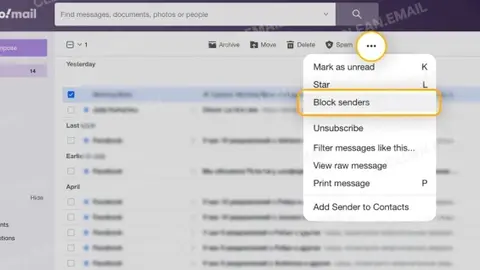
How to Block Emails on Any Device (Gmail, Outlook, Yahoo & iPhone)
Quick answer: To block an email on Gmail, open the email, click the three dots next to Reply, and choose Block “sender name.” Future emails from that sender go straight to Spam. Outlook, Yahoo and iPhone work in a similar way.
Sanebox Blog8 min read
How to Stop Spam Emails (and Keep Them From Coming Back)
Your inbox has a squatter problem. You delete ten “You’ve won!” emails before breakfast, and by lunch there are twelve more. It isn’t your imagination. According to Kaspersky’s 2025 telemetry, spam made up 44.99% of all global email traffic in 2025.
Sanebox Blog10 min read
SaneBox vs. Fyxer: Which AI Email Tool Is Better for Reducing Inbox Overload?
Fyxer and SaneBox both use AI to improve email, but they solve different problems. Fyxer is an AI email assistant that helps you work through your inbox with drafting, summaries and labels.
Sanebox Blog5 min read
SaneBox vs Superhuman: Which Email Tool Is Better in 2026?
— If you’re weighing SaneBox vs Superhuman, you’re comparing two of the best email management tools available. But they solve fundamentally different problems. Superhuman helps you process email faster. SaneBox helps you receive less email in the first place.
Sanebox Blog11 min read
SaneBox is now on Android
Our most requested launch yet is finally here: SaneBox for Android is live on Google Play, and we’re so excited for you to try it. Download SaneBox for Android A quick reminder of what we do SaneBox isn’t an email app.
Sanebox Blog2 min read
The Hidden Beliefs That Are Sabotaging Your Focus
If you want to be more productive but struggle to get there, the problem isn’t that you aren’t capable. More often, it’s the hidden beliefs shaping your behavior without you even realizing it.
Sanebox Blog6 min read
AI in Focus: The Podcast for Humans Navigating AI
There’s a lot of conversation about what AI can do. I’m more interested in what it should do. Should AI help you move faster? Absolutely. Should it replace your thinking? Definitely not.
Sanebox Blog1 min read
6 Best Cold Outreach Services
Cold email outreach isn’t dead. But inboxes are busy places, and the bar for getting a response has never been higher. Most cold email campaigns see response rates somewhere between 1% and 8%, depending on targeting and personalization, which means the tool or email service you choose can make a…
Sanebox Blog8 min read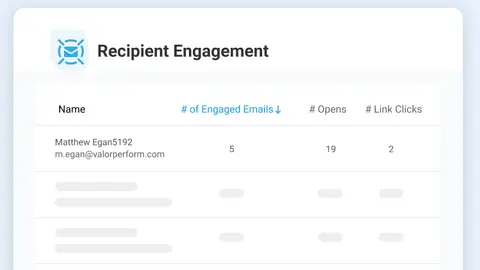
5 Best Email Tracking Tools (And the Metrics Actually Worth Tracking)
By SaneBox Team Is there anyone out there? In 2026, sending emails can feel like shouting in a crowded room. Many teams send hundreds, even thousands, of emails every week, but very few of them can confidently answer questions like: That’s exactly what email tracking tools are built to fix.
Sanebox Blog7 min read
Email Intelligence Report 2026: The 4 Forces Shaping How You Work
Your inbox is one of the most consequential places in your tech stack. It’s where you coordinate work, verify your identity, manage your finances, and (sometimes) reply to your family’s email forwards. But your inbox is more crowded and chaotic than ever before.
Sanebox Blog3 min read
Details are compiled from Sanebox's website and public sources, last verified Oct 3, 2026. Features and pricing change — confirm on the official site before you buy.
Try Sanebox
Paid · from $3.5/month
Tags
- Email Management
- Time-Saving
Comments
Sign in to join the discussion.